MZS TOEFL Course CBT
MZS TOEFL Course CBT is a Computer-Based Test (CBT) platform built for TOEFL courses, enabling students to register, purchase test access, and take scheduled TOEFL examinations online. The system covers the full test lifecycle — from question management and exam scheduling to automated scoring, manual review, and detailed result reporting.
Overview
| Type | Web Application (CBT Platform) |
| Stack | PHP, Laravel, MySQL, Xendit |
| Deployment | VPS |
Features
Platform (Superadmin)
- User Management — Manage all users across roles: admin, trainer, and student.
- Platform Settings — Configure global platform settings, scoring rules, and test parameters.
- Platform Analytics — Overview of registered students, active exams, revenue, and test completion rates.
Course Management (Admin & Trainer)
- Question Bank Management — Create, edit, and organize questions across all TOEFL sections: Listening Comprehension, Structure & Written Expression, and Reading Comprehension.
- Bulk Question Import — Import questions in bulk from Excel or Word files to speed up question bank setup.
- Exam Scheduling — Create exam periods with defined start and end dates, allowing students to choose their preferred test slot within the period.
- Result Review — Manually review and override scores for open-ended or flagged responses alongside the automated scoring system.
- Student Progress Tracking — Monitor individual student performance, test history, and score trends.
Student
- Course Registration — Register and purchase test access via one-time payment through Xendit.
- Exam Booking — Select a preferred test schedule within available exam periods.
- CBT Interface — Take TOEFL exams with a built-in timer system, section-by-section navigation, and auto-submit on timeout.
- Score & Results — View detailed results immediately after grading, including total score and breakdown per section (Listening, Structure, Reading).
- Result History — Access past exam results and score progression over time.
Tech Stack
| Technology | Purpose |
|---|---|
| PHP & Laravel | Backend framework, routing, business logic |
| MySQL | Relational database for questions, exams, and results |
| Blade Templating | Server-side rendered frontend views |
| Xendit | Payment gateway for one-time student registration payment |
| VPS | Deployment environment |
Roles & Access
| Role | Access |
|---|---|
| Superadmin | Full platform access — users, settings, analytics, all data |
| Admin | Course management — question bank, exam scheduling, student results, reports |
| Trainer | Question management, result review, student progress monitoring |
| Student | Registration, exam booking, CBT interface, personal results |
Exam Flow
- Student registers and completes one-time payment via Xendit
- Student selects an available exam slot within the scheduled period
- On exam day, student enters the CBT interface — timer starts automatically
- System auto-submits when time runs out
- Objective questions are scored automatically; flagged items go to trainer review
- Final score is published with section breakdown (Listening / Structure / Reading)
Highlights
This project required careful engineering around exam integrity and timing — ensuring the timer is reliable, auto-submission works correctly on timeout, and students cannot re-enter a completed exam. The dual scoring system (automated + manual review) adds flexibility for complex question types, while Xendit integration handles one-time payments cleanly with webhook-based payment confirmation.
Database Design
Designed with 12 tables covering platform users, question bank, exam scheduling, student registrations, exam sessions, answers, scoring, and payments. All relationships are enforced with foreign keys.
| Table | Description |
|---|---|
users |
All platform users with role (superadmin / admin / trainer / student) |
courses |
Available TOEFL courses with pricing and description |
registrations |
Student course registrations with payment status |
payments |
Xendit payment records per registration |
question_bank |
Questions categorized by section type and difficulty |
question_options |
Answer options per question |
exam_periods |
Scheduled exam periods with start and end dates |
exam_slots |
Available time slots within each exam period |
exam_sessions |
Student exam sessions linked to a slot with timer and status |
student_answers |
Student answers per question per session |
scores |
Final scores per session with section breakdown |
score_reviews |
Manual review records by trainer for flagged answers |
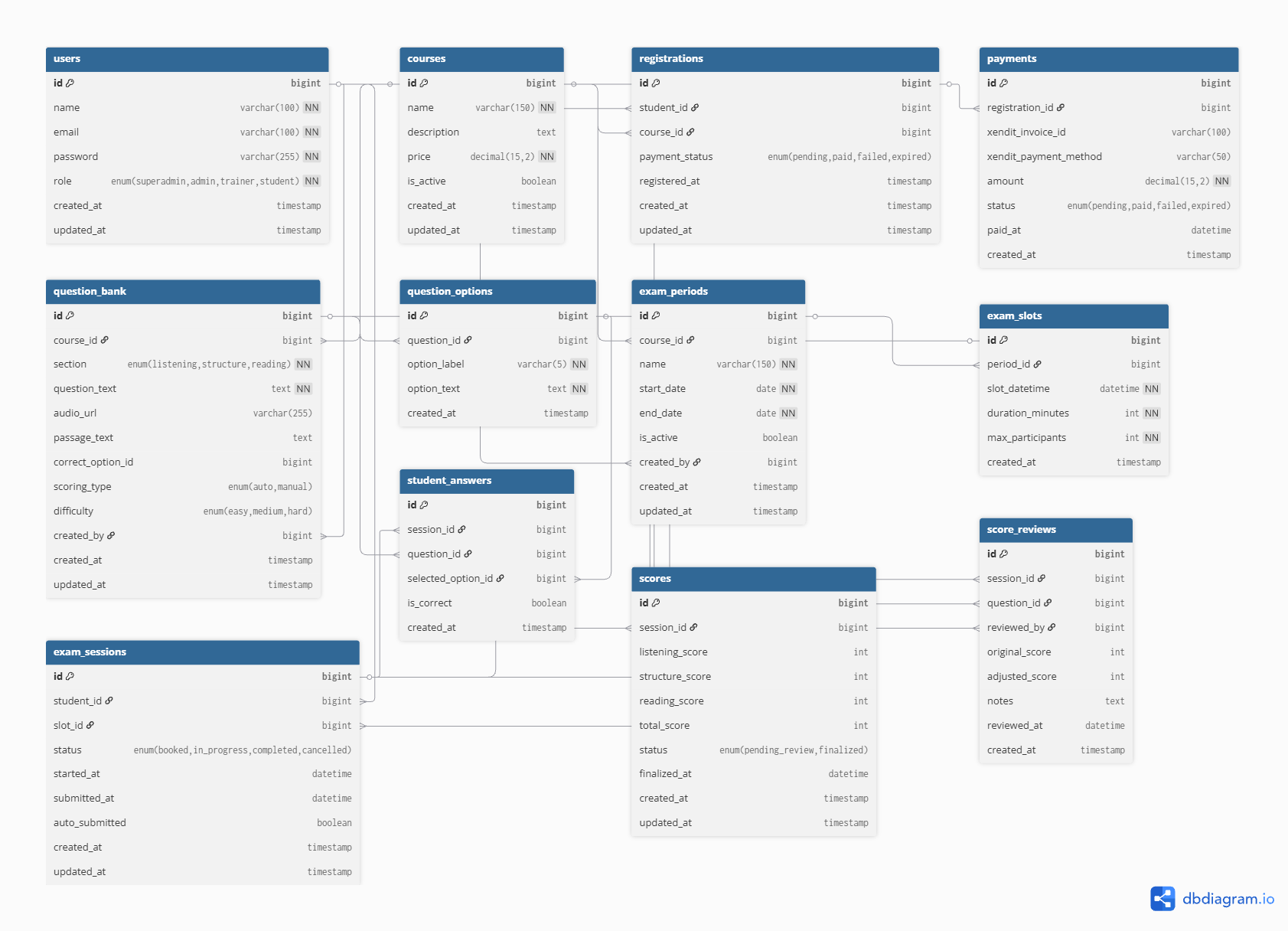
View full ERD on dbdiagram.io — paste the DBML below to render it.